The internet link
Fiber, fixed wireless, cellular and Starlink bring a connection to the site. Availability and actual-work testing determine whether it is useful.
Business internet / planning worksheet
Choose business internet around the work that must happen, the site or route, and the interruption you can tolerate. Compare the available connections, plan local Wi-Fi separately, and agree on an acceptance test before buying equipment.
Build your project scopeFiber, fixed wireless, cellular and Starlink bring a connection to the site. Availability and actual-work testing determine whether it is useful.
Cabling, access points and links between buildings get that connection to people. A new satellite terminal does not establish Wi-Fi coverage in every room.
A second connection needs routing, power and a tested handover. Failover may restore connectivity while an active call or VPN still needs to reconnect.
Compare the options
Start with the options actually available at your address or on your route. These are planning considerations, not a speed ranking or a promise of availability.
| Connection | Where it can fit | Check before choosing | Limit to account for |
|---|---|---|---|
| Fiber | A fixed business site where a suitable circuit is available. | Confirm the service address, lead time, upload needs, contract and fault response. | A second circuit may share the same duct, power or upstream failure. Verify the actual route. |
| Fixed wireless | A fixed site with a suitable local provider and usable radio path. | Arrange an address-specific survey and test during operating hours. | Terrain, obstructions, provider capacity and the local radio path can constrain the service. |
| 4G / 5G | A temporary site, moving operation or backup link with usable cellular coverage. | Test the actual operator, antenna position, busy hours and route; review data and business-use terms. | A coverage map cannot establish performance inside a metal building or along every route. |
| Starlink | A remote or temporary site, or an additional internet path where the site and service terms fit. | Check sky view, power, mounting, the exact hardware, applicable plan and business applications. | The terminal does not by itself provide warehouse-wide Wi-Fi, automatic failover or uninterrupted sessions. |
RNP planning recommendation: keep a usable existing connection until the proposed replacement passes the business tasks that matter. A coverage problem inside the building may need network work rather than a different internet provider.
Six operating situations
Use the questions below to make the scope specific. Each test is a proposed acceptance activity to agree with the installer and network owner.
01 / Warehouses
Assess the internet link and the warehouse network separately. A new terminal can provide another internet path while scanners still lose Wi-Fi between metal racks.
02 / Construction sites
Plan the trailer, power and equipment ownership before choosing a connection. Recheck the terminal position when cranes, materials or the building change its surroundings.
03 / RV rental operators
Start with a parked-use pilot and a clear customer handover. Commercial rental use, account control, power and equipment recovery need their own checks; owning a portable kit does not settle them.
04 / Bus & coach operators
Treat in-motion permission and passenger Wi-Fi as separate design decisions. Verify the exact equipment, mount, service plan, countries and route before testing a vehicle in motion.
05 / Multiple buildings
An internet connection at the main building does not establish coverage in a cabin, workshop or detached office. Compare routes between buildings and provide local coverage at each destination.
06 / Business backup
A backup terminal needs a compatible router, deliberate failover settings and a recovery test. Switching internet paths may interrupt active calls, VPNs or transactions; automatic switching does not promise session continuity.
A brief you can use
Choose the operating situation and the work that matters. The worksheet turns your selections into questions, scope items and acceptance checks you can copy or print. It does not calculate a quote or send an enquiry.
01 / Describe the job
Describe the task, location and acceptable interruption. This is your proposed target, not an RNP performance promise.
Your selections stay in this page. This worksheet does not send or save them to RNP. Copy or print the scope before closing the page.
02 / Your project brief
Planning scope · not a quoteCompare address-specific fiber, fixed wireless, cellular and Starlink options against the operating task and installation deadline.
Define an observable business task, where and when it must work, and acceptable interruption before accepting the installation.
Prepared with RNP · withrnp.com/business-internet. A planning worksheet, not a quote, booking or performance guarantee.
Discuss this scope with RNP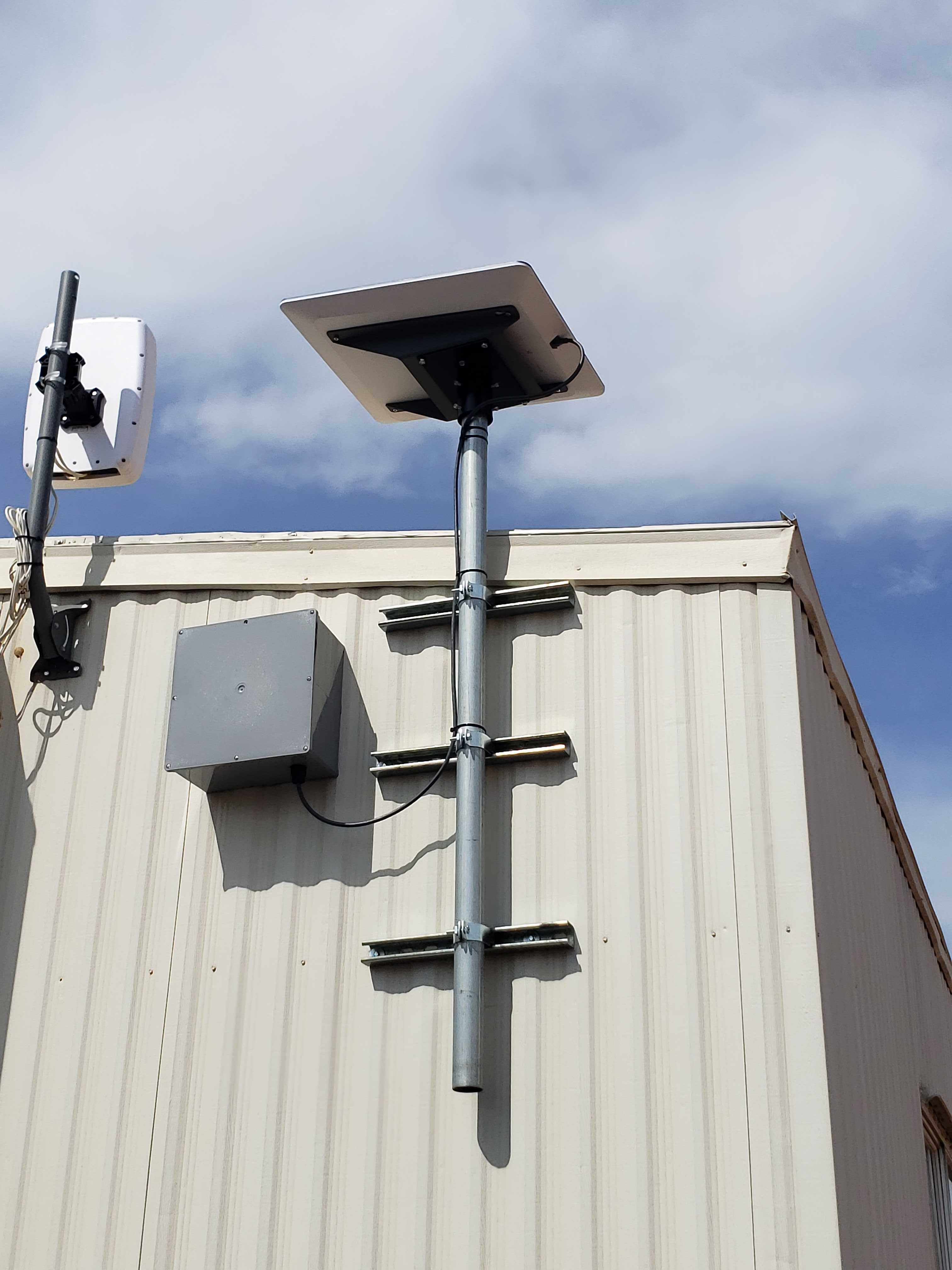
Completed work / Decatur, Texas
RNP’s completed rural warehouse installation near Decatur covered mounting, protected cabling, integration with the existing network, testing and handover.
The published case study documents the scope and an original project photograph. Before-and-after speeds and the project price have not been published. It is an example of completed work, not a performance forecast for another property.
Read the completed projectCheck the current requirements
This worksheet contains RNP’s planning recommendations. Starlink’s current requirements govern its hardware and service. Verify the exact kit, mount, intended commercial use and geography when specifying a project.
Explore all business internet guides